
XSLT Editor
The easy XSLT editor in XMLBlueprint has full support for XSLT (1.0, 2.0, 3.0) and XPath (1.0, 2.0, 3.1). It has numerous intelligent editing features that help you edit and transform XSLT Stylesheets quickly and easily.
Download a free, fully-functional 15-day trial of XMLBlueprint. There are no restrictions.
XMLBlueprint benefits include:
- Run your XSLT 1.0, XSLT 2.0 or XSLT 3.0 Stylesheets with your choice of XSLT processor.
- Start the transformation from either the XML or the XSLT document.
- No need to save your file before you start the transformation.
- You can easily switch the output between Text and Browser format.
- Choose how you want XMLBLueprint to handle the XSLT output, your settings are saved.
- Your Stylesheet is automatically validated with the active XSLT processor, showing the errors in the errorlist. Clicking on an error jumps to the error.
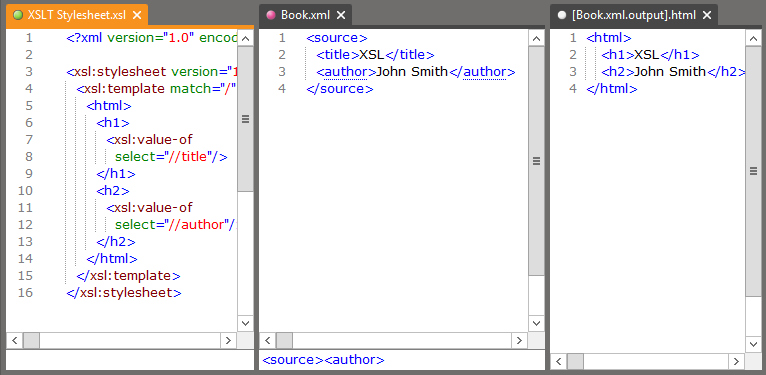
Three XSLT editors side-by-side
In XMLBlueprint you can have three editors side-by-side to edit your XSLT stylesheet, the XML input and view the output simultaneously.
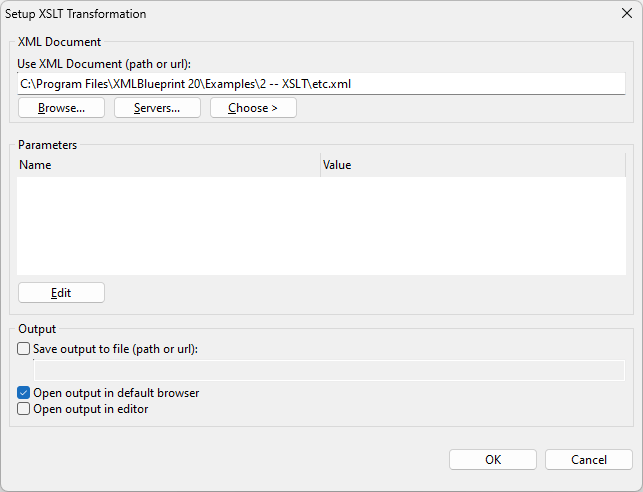
XSLT setup
From the active document, you first choose the XML or XSLT file to use in the transformation. Then, for the transformation output you can choose one or more of these options:
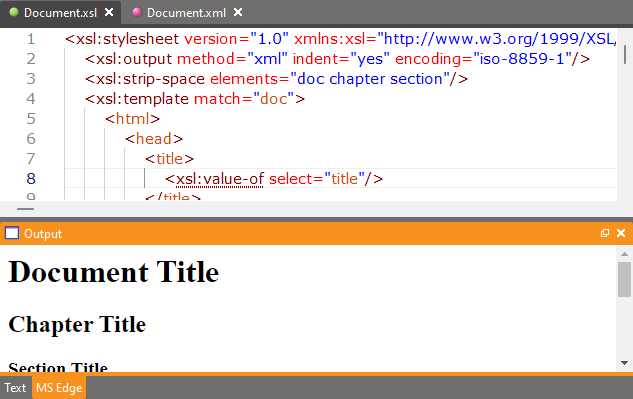
- Preview in the Output view.
- Open in an XMLBlueprint editor.
- Save to a file.
You only have to setup once, the settings will be saved for future sessions.
Running XSLT from the Command Line
You can start XMLBlueprint XML editor and run the transformation of your XSLT, but sometimes you only need to run the transformation and you don't want the editor to open. XMLBlueprint provides commands for you to run xslt 1.0, 2.0 or 3.0 from the command line on Windows.
At the Command prompt type:
- XSLT {XSLT File} {XML File} {Output File}
The generated output is redirected to the output file provided in your command.
Supported XSLT Processors
XMLBlueprint supports the following XSLT processors:
| XSLT 1.0 | XSLT 2.0 | XSLT 3.0 |
MSXML 6 | yes | no | no |
Saxon-HE 12 (Java) | yes | yes | yes |
Saxon-PE 12 (Java) (license needed) | yes | yes | yes |
Saxon-EE 12 (Java) (license needed) | yes | yes | yes |