
XPath Tester
XMLBlueprint's XPath Tester provides an easy way to evaluate XPath Expressions.
XMLBlueprint benefits:
- Syntax coloring and automatic syntax checking to help you write valid expressions.
- An easy way to refer to the default namespace.
- Use the resulting nodes to navigate your XML document.
- Copy the XPath expression of the current node in your XML document to the XPath evaluator.
Supported XPath Processors
XMLBlueprint supports the following XPath processors:
| XPath 1.0 | XPath 2.0 | XPath 3.1 |
MSXML 6 | yes | no | no |
Saxon-HE 10 (Java) | yes | yes | yes |
Saxon-PE 10 (Java) (license needed) | yes | yes | yes |
Saxon-EE 10 (Java) (license needed) | yes | yes | yes |
Let's take a look at some of the tools for working with XPath in XMLBlueprint.
The XPath Builder allows you to quickly generate an XPath expression. Simply select a node in the XML Editor and then right-click to select Copy XPath. The associated XPath expression is placed on the Clipboard and you can paste it into your XSLT or XSD as necessary.
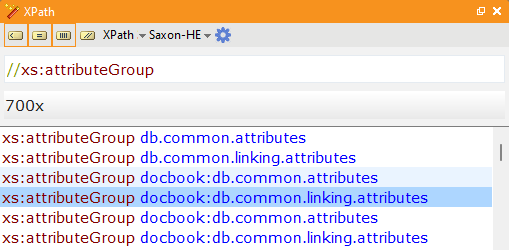
XMLBlueprint also includes the XPath Evaluator, a dockable window you can use to write and test XPath expressions. As you type, any syntax errors are indicated by a red wavy line, while syntax coloring makes it easier to distinguish between various parts of the expression. Pressing theEvaluate button will display the resulting node set. Clicking on any of the returned nodes highlights the corresponding node in the XML Editor.
XMLBlueprint's XPath Evaluator is a great tool for writing and testing XPath expressions and can save hours of debugging time.
Download a free, fully-functional 15-day trial of XMLBlueprint. There are no restrictions.